I find the latest Dell XPS 13 pricing interesting for one reason: the same laptop family now covers two very different budgets.
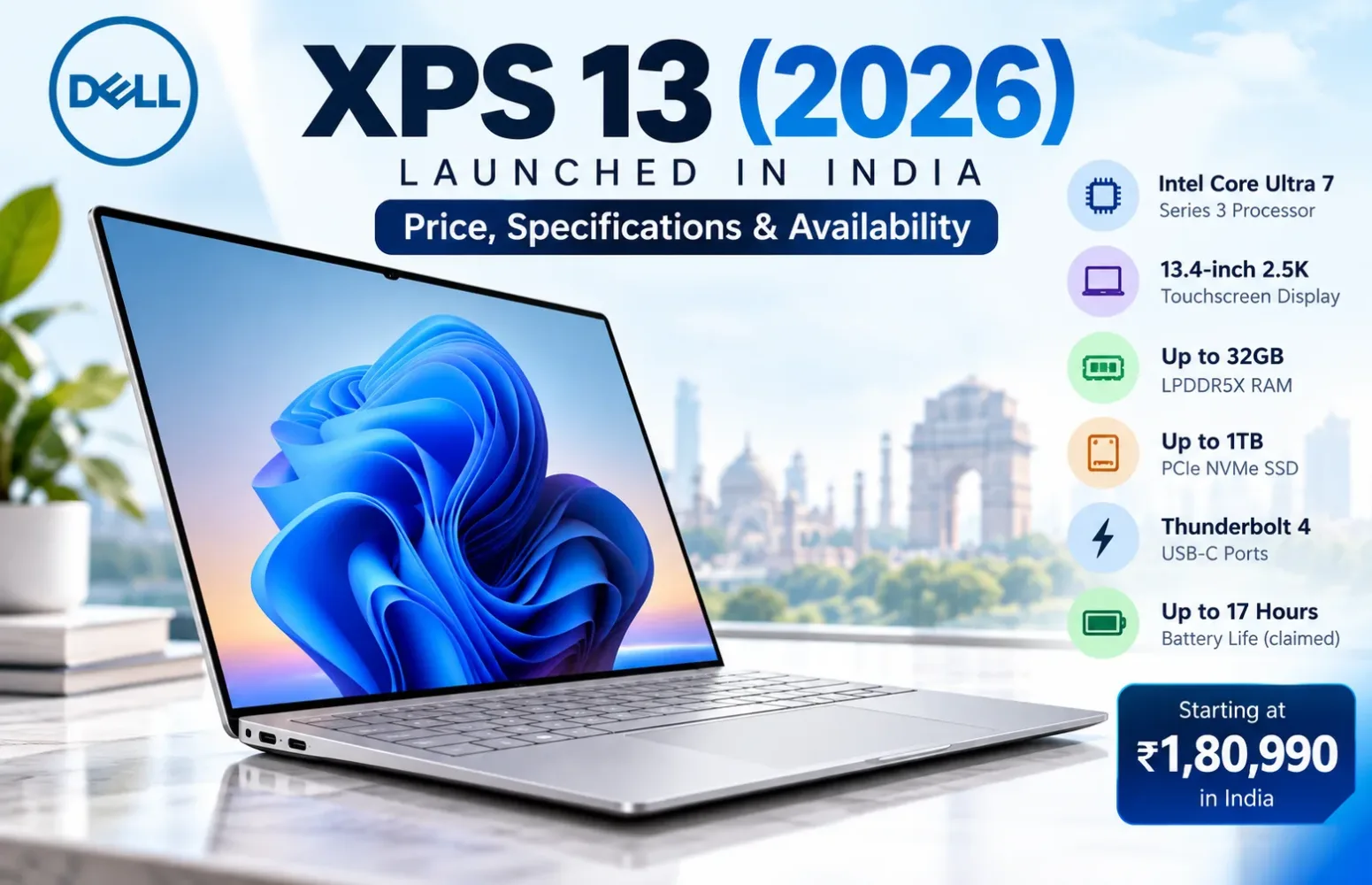
Dell introduced the redesigned XPS 13 in India in July 2026, starting at ₹79,990. The company has now added Intel Core Ultra 7 Series 3 configurations, with the new premium options priced from ₹1,80,990.
That is a substantial jump for a laptop that retains the same compact 13.4-inch design. The higher-priced models bring a different processor platform, more memory options and Thunderbolt 4 connectivity, but the basic appeal remains unchanged: a premium Windows laptop that is exceptionally easy to carry.
For buyers, the question is no longer simply whether the new XPS 13 looks attractive. It is whether the more expensive configuration makes sense for the work they intend to do.
Dell XPS 13 (2026) Price in India and Availability
The newly introduced Intel Core Ultra 7 configurations are available in three memory and storage combinations.
| Configuration | India Price |
|---|---|
| Intel Core Ultra 7 355, 16GB RAM, 512GB SSD | ₹1,80,990 |
| Intel Core Ultra 7 355, 16GB RAM, 1TB SSD | ₹2,00,990 |
| Intel Core Ultra 7 355, 32GB RAM, 1TB SSD | ₹2,41,990 |
These are the reported India launch prices for the new Core Ultra configurations. Dell’s online store lists the new models for purchase, with Sky among the available finishes. Pricing and delivery estimates may change.
It is also worth separating these models from the original Intel Core 5 320 versions introduced earlier in the year.
The Core 5 range launched in India at ₹79,990, with a 16GB RAM and 512GB SSD configuration listed at ₹94,990. The lower-priced models are worth considering before deciding whether the upgrades in the Core Ultra 7 versions justify the higher cost.
I would not treat ₹1,80,990 as the starting price of the entire 2026 XPS 13 family. It is the entry price for the newer Core Ultra 7 configurations.
Dell XPS 13 (2026) Key Specifications
The specifications below focus on the new Intel Core Ultra 7 model, identified by Dell’s DX13260 product family.
| Specification | Details |
|---|---|
| Model | Dell XPS 13 DX13260 |
| Processor | Intel Core Ultra 7 355, Series 3 |
| CPU | 8 cores, up to 4.7GHz |
| Graphics | Integrated Intel Graphics |
| RAM | 16GB or 32GB LPDDR5X |
| Memory speed | Up to 7467 MT/s |
| Storage | 512GB or 1TB PCIe NVMe SSD |
| Display | 13.4-inch 2.5K LCD touchscreen |
| Resolution | 2560 × 1600 pixels |
| Refresh rate | Variable 30–120Hz |
| Brightness | 500 nits, Dell specification |
| Colour coverage | 100% DCI-P3, typical manufacturer specification |
| Battery | 52Wh, 3-cell |
| Charging | 65W USB-C adapter |
| Ports | Two Thunderbolt 4 USB-C ports |
| Wireless | Wi-Fi 7, Bluetooth 6.0 |
| Webcam | 1080p FHD with IR camera |
| Speakers | Four speakers, 8W total peak output |
| Operating system | Windows 11 Home |
| Chassis | CNC-machined aluminium |
| Weight | Starting at approximately 1kg |
| Thickness | 12.7mm |
The main specifications are reasonably consistent across the Core Ultra variants. Memory and SSD capacity account for the most obvious differences between the three India-listed options.
The Core Ultra 7 Processor Is the Main Hardware Change
Intel’s Core Ultra 7 355 belongs to its Series 3 processor family, developed under the Panther Lake platform.
It uses eight CPU cores, combining four performance cores with four low-power efficiency cores, and can reach up to 4.7GHz under supported conditions.
For everyday work, that puts the laptop in a useful category. Office applications, browser-based tools, video meetings, programming environments and general productivity are all natural workloads for this kind of system.
What I would be careful about is assuming that the Core Ultra 7 branding guarantees a dramatic improvement over every cheaper laptop.
The XPS 13 is still an unusually thin machine. Its actual performance during long compilation jobs, large exports or other demanding workloads will depend on the cooling system and the processor’s sustained operating power.
Dell uses a dual-fan cooling design, but that alone does not tell us how the new configurations perform under prolonged load.
Without directly comparable independent tests for these exact variants, I would avoid assigning a performance percentage to the upgrade.
What about AI performance?
The Core Ultra 7 355 includes an NPU rated by Intel at up to 49 TOPS.
This makes the processor suitable for supported on-device AI workloads, including eligible Windows AI features. Dell also identifies certain Core Ultra configurations as Copilot+ PCs.
There is a practical distinction between the availability of an NPU and the usefulness of AI features. Not every application uses dedicated NPU hardware, and Windows features can depend on software updates and regional availability.
I would therefore consider AI support an additional capability rather than the main reason to spend nearly ₹1.81 lakh.
A 2.5K Touchscreen That Deserves Attention
The 13.4-inch display is one of the more convincing parts of the XPS 13 design.
Dell uses a 2560 × 1600 LCD touchscreen with a 16:10 aspect ratio. The extra vertical space is useful for documents, spreadsheets, programming and web pages, particularly on a display this small.
The panel also supports variable refresh rates between 30Hz and 120Hz.
That matters because a higher refresh rate can make scrolling and interface movement feel noticeably smoother. The ability to reduce the refresh rate when appropriate can also help manage power consumption.
Dell specifies 500 nits of typical brightness and 100% DCI-P3 colour coverage under its published display specifications.
The wide colour gamut is encouraging for photography and visual work, although a manufacturer colour-coverage specification is not the same as an independently measured colour-accuracy result.
I would want independent calibration testing before recommending the display for colour-critical professional work.
Another point worth making: this is an LCD panel, not OLED.
Buyers who specifically want OLED-level black depth should not assume that the XPS name guarantees an OLED display. On the other hand, a good LCD can be a perfectly sensible choice for long productivity sessions.
The Design Makes More Sense Than the Price Suggests
One kilogram is impressively light for a full Windows laptop with a metal chassis.
The XPS 13 measures approximately 296.9mm wide, 200.66mm deep and just 12.7mm thick, making portability a central part of its appeal.
Dell uses CNC-machined aluminium, a backlit keyboard and a glass touchpad. The design moves towards a more conventional everyday laptop experience rather than relying entirely on unusual interface choices.
For a student moving between classrooms or someone carrying a laptop to meetings throughout the day, that size and weight can make a genuine difference.
The compact body is not an advantage for everyone, though.
A 13.4-inch screen may feel restrictive for users who regularly keep multiple large windows open. I would also consider a larger display for sustained video editing, detailed spreadsheets or design applications.
The XPS 13 makes the most sense when portability is a daily requirement rather than an occasional convenience.
RAM and Storage: Choose the Configuration Carefully
Memory is one of the most important buying decisions here.
The new Intel Core Ultra 7 versions are listed with 16GB or 32GB of LPDDR5X RAM.
For ordinary productivity, 16GB is a reasonable starting point. Someone working with larger development projects, virtual machines or demanding creative applications may benefit from 32GB.
However, the memory is soldered, so buyers should not expect to upgrade it later.
That makes the ₹41,000 difference between the 16GB/1TB and 32GB/1TB configurations particularly important.
I would consider the 32GB model only when the intended workload justifies the additional capacity.
The SSD situation is better. Dell’s DX13260 service documentation includes instructions for removing and replacing the internal SSD.
That is useful for long-term ownership, although replacement still requires opening the laptop and following proper service procedures. Dell’s documentation does not establish an additional empty storage slot.
If storage is the only concern, the 16GB/512GB configuration may be worth examining before paying substantially more for a factory-fitted 1TB drive.
Thunderbolt 4 Is Useful, but Two Ports Are Still Limiting
One technical difference between the processor variants deserves more attention than it usually receives.
Dell’s documentation identifies two USB 3.2 Gen 2 Type-C ports on the standard Core 5 models.
The Intel Core Ultra versions instead support two Thunderbolt 4 USB-C ports, with DisplayPort 2.1 and USB Power Delivery support.
For users with compatible docks, fast external storage and external monitors, Thunderbolt 4 is a meaningful advantage.
But I still find the physical port selection restrictive.
There is no built-in USB-A port, HDMI connector or SD card reader. Users who regularly connect older accessories, presentation displays or memory cards will need suitable adapters or a dock.
There is also no conventional 3.5mm headphone connector listed for this model.
A thin laptop can justify removing some ports, but buyers should include the cost and inconvenience of adapters in their decision.
Battery Life: What Dell’s 17-Hour Claim Actually Means
The XPS 13 contains a 52Wh battery and supports USB-C charging through a 65W adapter.
Dell advertises up to 17 hours of streaming battery life for the product family.
There is an important qualification.
That figure comes from Dell’s laboratory testing of an Intel Core 5 320 configuration with 16GB RAM, a 512GB SSD and the 2.5K LCD display. Testing used a display brightness of 150 nits during Netflix video playback.
It should not be presented as an independently verified result for the new Core Ultra 7 model.
Actual runtime will vary with workload, brightness, connected accessories and software behaviour.
I would expect battery efficiency to be an important part of the ownership experience, but I would wait for comparable Core Ultra 7 battery testing before making any stronger claim.
Is the Dell XPS 13 (2026) Good for Gaming or Content Creation?
The new XPS 13 relies on integrated Intel Graphics rather than a dedicated NVIDIA or AMD GPU.
For everyday graphics acceleration, media playback, lightweight image work and some less demanding games, integrated graphics can be useful.
The machine is not designed as a dedicated gaming laptop.
For demanding games or graphics-heavy applications, real-world performance results matter far more than the processor’s specifications alone.
The same caution applies to creative applications.
Light photo editing and occasional video work are reasonable use cases to consider. However, high-resolution multicamera editing, complex 3D scenes and GPU-heavy rendering can place much greater demands on memory and graphics hardware.
The 32GB model offers more working memory, but that does not turn the XPS 13 into a workstation.
Dell XPS 13 vs MacBook Air M5: An Expensive Decision
At ₹1,80,990, the Core Ultra 7 XPS 13 enters a competitive premium-laptop segment.
Apple’s 13-inch MacBook Air M5 starts at ₹1,49,900 in India, with 16GB of unified memory and 512GB of storage in its entry configuration.
That leaves the Dell costing ₹31,090 more when comparing the published starting prices of these particular configurations.
I would not claim that one is faster without comparable performance testing.
Instead, the choice begins with the operating system and the features buyers actually need.
The Dell provides a touchscreen, variable refresh rate up to 120Hz and Windows compatibility, alongside Thunderbolt 4 connectivity.
The MacBook Air is worth considering for buyers who prefer macOS, particularly those already working within Apple’s ecosystem.
For someone dependent on Windows-only applications, choosing the Dell may be straightforward. For a buyer with no operating-system preference, however, the price difference makes the XPS 13 harder to recommend without examining the alternatives.
There is another comparison that should not be ignored: Dell’s own less expensive Core 5 XPS 13.
If a buyer primarily needs a portable laptop for browsing, office work and study, I would compare that model before moving to the premium Core Ultra version.
Should You Buy the Dell XPS 13 (2026)?
I think the new XPS 13 has a clear appeal, but the Intel Core Ultra 7 models need a more demanding value assessment than the original affordable configurations.
A well-equipped 13.4-inch touchscreen, 1kg aluminium chassis, Wi-Fi 7 and Thunderbolt 4 connectivity make an attractive combination for frequent travellers and Windows-focused professionals.
The concern is price.
At nearly ₹1.81 lakh for the starting Core Ultra model, the XPS 13 competes with laptops that may provide larger displays, different processor options or more flexible connectivity.
I would shortlist it for someone who specifically wants a very lightweight premium Windows machine and values the touchscreen and compact dimensions.
For general productivity, the cheaper XPS 13 configurations deserve serious consideration. For demanding creative work or gaming, I would look more closely at laptops built around those workloads.
What makes the 2026 XPS 13 appealing is its lightweight design, compact size and premium features rather than the processor alone. It is how much useful laptop Dell has fitted into a remarkably portable design.
Whether that is worth the premium depends on how often the buyer actually needs that portability.
Frequently Asked Questions
How much does the 2026 Dell XPS 13 cost in India?
The 2026 XPS 13 family was introduced in India from ₹79,990 with an Intel Core 5 processor. The newer Intel Core Ultra 7 configurations start at ₹1,80,990.
What processor options are available with the Dell XPS 13 (2026)?
The newly introduced premium configurations use the Intel Core Ultra 7 355, part of Intel’s Series 3 family. Lower-priced models use the Intel Core 5 320.
Can the Dell XPS 13 RAM be upgraded?
No. The LPDDR5X memory is soldered. Buyers should choose the required capacity when purchasing the laptop.
Does the Dell XPS 13 support Thunderbolt 4?
Yes, the Intel Core Ultra processor versions have two Thunderbolt 4 USB-C ports. The standard Core 5 models use USB 3.2 Gen 2 Type-C ports instead.
Is the 2026 Dell XPS 13 available with an OLED screen?
The 2026 DX13260 configuration discussed here uses a 13.4-inch 2.5K LCD touchscreen, not an OLED panel.
What battery life can buyers expect from the 2026 Dell XPS 13?
According to Dell’s testing, the Intel Core 5 version can provide up to 17 hours of video streaming under specific laboratory conditions. This figure should not be assumed to apply to the Core Ultra 7 models. That figure is not a verified runtime for the newer Core Ultra 7 models.
Report an issue with this article
Spotted outdated information or a broken link? The article URL is included automatically. Reports are private. Please do not include sensitive personal information.
Contact us at itechvora@gmail.com with the article link.