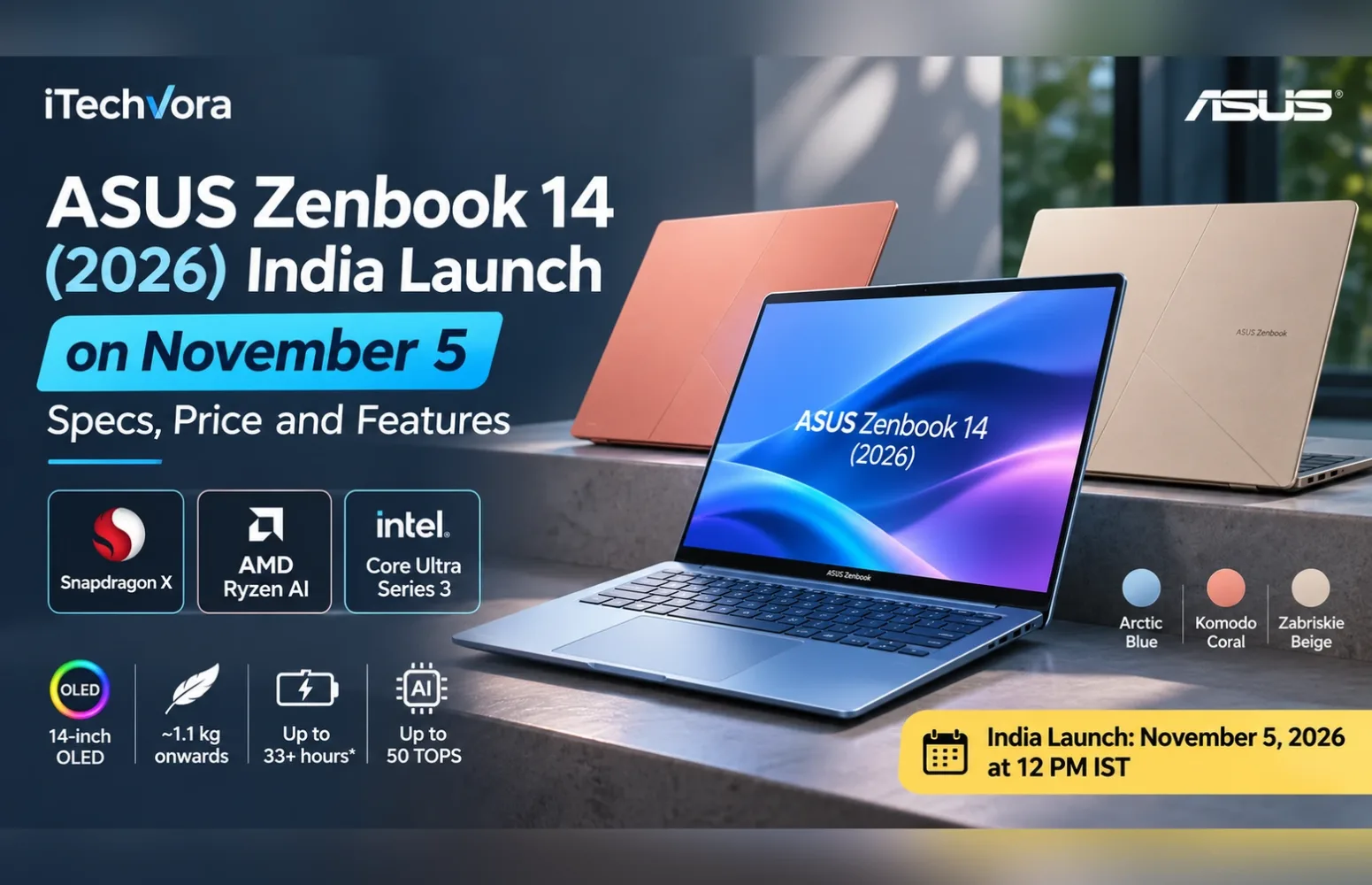
The new ASUS Zenbook 14 is arriving in India on November 5, 2026, but I think the most interesting part of this launch isn’t its design or the promised battery life. It’s the choice of processors.
ASUS is preparing three versions built around Qualcomm Snapdragon, AMD Ryzen AI and Intel Core Ultra hardware. They share the Zenbook name, yet the differences could be significant for anyone choosing a laptop for work, study or creative projects.
The company has confirmed the launch date, colour options and several headline features. Its international product listings also provide a closer look at the hardware.
However, ASUS has not yet announced the complete India-specific configurations or official prices for this upcoming lineup.
That distinction matters because a laptop sold under the same family name may have a different display, memory capacity, battery or connectivity options depending on its processor and market.
ASUS Zenbook 14 (2026) India Launch: Key Details
| Detail | Information |
|---|---|
| Product | ASUS Zenbook 14 (2026) |
| Family | UX3480 series |
| India launch | November 5, 2026 |
| Launch time | 12 PM IST |
| Processor platforms | Qualcomm Snapdragon X, AMD Ryzen AI, Intel Core Ultra Series 3 |
| Display | 14-inch OLED; specifications vary by version |
| Design | Metal chassis with Ceraluminum lid |
| Colours | Arctic Blue, Komodo Coral, Zabriskie Beige |
| Weight | Starting from approximately 1.1kg |
| Battery-life claim | Up to 33+ hours on a selected AMD configuration |
| AI hardware | Dedicated NPU, up to 50 TOPS depending on processor |
| India price | Not announced |
| India availability | Individual sale dates and configurations not yet confirmed |
Configuration note: These details describe the new laptop family. International specifications should not be interpreted as the final Indian retail configuration.
Three Processor Options Make This More Than a Routine Laptop Refresh
The biggest decision for buyers may come before choosing RAM or storage: which processor platform makes sense for their software?
ASUS has confirmed Snapdragon X, AMD Ryzen AI 7 345 and Intel Core Ultra Series 3 options for its upcoming Indian range.
Its international documentation identifies three model families.
| Model | Processor examples | Graphics | NPU |
|---|---|---|---|
| UX3480QA | Snapdragon X X1 26 100 | Qualcomm Adreno | Up to 45 TOPS |
| UX3480KA | AMD Ryzen AI 7 345 | AMD Radeon integrated graphics | Up to 50 TOPS |
| UX3480AA | Intel Core Ultra 9 386H | Intel integrated graphics | Up to 50 TOPS |
These are documented international configurations, not a confirmed list of Indian retail SKUs.
Snapdragon: An Interesting Option, With Software Compatibility to Consider
The Snapdragon X X1 26 100 listed internationally has eight CPU cores and eight threads. ASUS pairs it with Qualcomm Adreno graphics and a dedicated Hexagon NPU.
For someone whose work revolves around browser applications, documents, presentations and communication tools, the Snapdragon model deserves attention.
However, Windows on Arm introduces an additional buying consideration.
Many Windows applications run natively on Arm, while others may rely on emulation. Certain specialist applications, device drivers and games can still present compatibility limitations.
If I were buying this version for professional software development, unusual peripherals or gaming, I would check the exact applications before ordering.
AMD Ryzen AI: A Potentially Practical Middle Ground
The AMD model, UX3480KA, is listed with a Ryzen AI 7 345 processor featuring six cores and twelve threads.
Its international specifications include integrated Radeon graphics and an AMD XDNA NPU rated at up to 50 TOPS.
This is the version I would examine closely for buyers who want a conventional Windows laptop for productivity, multitasking and occasional creative work without moving to an Arm-based platform.
But processor specifications alone cannot establish how well the laptop performs during long exports, compiling workloads or sustained multitasking. Cooling and power behaviour still need independent testing.
Intel Core Ultra: Watch the Exact Configuration
The Intel model, UX3480AA, has international configurations reaching the Core Ultra 9 386H, with 16 cores and 16 threads.
ASUS also lists Core Ultra 7 355 and Core Ultra 5 325 options globally.
The Core Ultra 9 sounds attractive, but I wouldn’t automatically pay extra for it without checking the price difference and performance of the exact configuration.
A thin 14-inch chassis has different thermal constraints from a larger performance laptop. Until reliable testing becomes available, sustained performance, fan noise and temperature behaviour remain open questions.
The OLED Display Could Be a Bigger Upgrade Than the Processor
All three internationally documented UX3480 versions have OLED display options, but they are not identical.
The Snapdragon and AMD specifications list a 14-inch OLED screen with 1920 × 1200 resolution and a 60Hz refresh rate.
The Intel version offers more choices, including a 2880 × 1800 OLED panel running at 120Hz.
ASUS rates the higher-resolution Intel display for 100% DCI-P3 colour coverage, 500-nit brightness and up to 1,100 nits of HDR peak brightness.
That last number requires some context. HDR peak brightness is not the same as sustained full-screen brightness, and ASUS’s figures are manufacturer specifications rather than independent measurements.
For regular office work, I would not reject the 60Hz OLED screen. It provides a practical 16:10 workspace and could be sufficient for writing, spreadsheets and everyday browsing.
The 120Hz option becomes more interesting if smoother scrolling, higher resolution and detailed visual work matter to you.
Creative professionals should still look for independent colour-accuracy testing before treating either panel as a fully validated professional editing display.
Readers comparing these resolutions can also use iTechVora’s Display Pixel Density Calculator to understand how screen size affects perceived sharpness.
RAM and Storage: Check These Before Buying
One detail could have a bigger impact on long-term ownership than the NPU rating.
ASUS’s international specifications show onboard LPDDR5X memory.
Depending on the platform, the published options include:
- Snapdragon: 8GB or 16GB RAM.
- AMD: 8GB, 16GB or 24GB RAM.
- Intel: 16GB or 24GB RAM.
These are regional specification options, not guaranteed India configurations.
The memory is onboard, meaning buyers should not expect to add conventional RAM modules later.
For basic productivity, 16GB may be sufficient. Someone regularly running several development tools, large spreadsheets or editing applications could benefit from a higher-capacity configuration.
Storage specifications also vary, with internationally listed PCIe SSD capacities ranging from 256GB to 1TB.
ASUS documents one M.2 storage slot, including the occupied slot. That means there is no documented second M.2 slot for adding another SSD.
Buyers should verify the exact model’s service documentation before attempting a replacement.
How Much Battery Life Can You Really Expect?
ASUS is advertising up to 33+ hours of battery life, which is certainly an attention-grabbing number.
But I would be careful about interpreting it as three full working days away from a charger.
ASUS’s published test information identifies an AMD UX3480KA configuration with:
- Ryzen AI 7 345 processor
- 24GB RAM
- 1TB SSD
- 1920 × 1200 OLED display
- 70Wh battery
The company conducted its tests using a 1080p video-playback scenario, with display brightness set to 150 cd/m², Windows Balanced power mode and Wi-Fi enabled but disconnected from an access point during playback.
That is very different from running video calls, browsers, multiple productivity applications and background services throughout the day.
International specifications also list different battery capacities across the family, including 50Wh and 70Wh options.
A buyer comparing battery claims should therefore identify the exact configuration and testing conditions first.
You can explore how battery capacity and average power consumption affect estimated usage with iTechVora’s Laptop Battery Runtime Calculator. It is an estimation tool, not a substitute for a controlled review.
Slim Design, Three Colours and Practical Connectivity
ASUS has chosen Ceraluminum for the Zenbook 14’s lid, combined with a metal chassis.
The company says the material helps resist everyday scratches, wear and fingerprint marks.
The upcoming Indian range will be available in Arctic Blue, Komodo Coral and Zabriskie Beige.
Weight starts at approximately 1.1kg, although ASUS’s international specification sheets show heavier configurations too.
This is worth checking if portability is your main buying reason. A small difference in weight matters less than the combined experience of carrying the laptop, charger and accessories every day.
The connectivity differences are equally important.
International specifications show:
| Platform | Higher-speed USB-C connection |
|---|---|
| Snapdragon | USB 3.2 Gen 2 Type-C, up to 10Gbps |
| AMD | USB4 Type-C, up to 40Gbps |
| Intel | Thunderbolt 4, up to 40Gbps |
The documented configurations also include USB-A, HDMI and a 3.5mm audio connection.
The USB-C ports support charging and display output in the published specifications, with ASUS listing a 68W USB-C power adapter.
For buyers using external SSDs, docking stations or multiple peripherals, I would check the actual ports before concentrating on the processor badge.
If you experience charging problems with a USB-C laptop, our guide to fixing laptop USB-C Power Delivery issues explains why port capability, charger wattage and cable compatibility matter.
What About AI Features?
ASUS is positioning the new Zenbook 14 models as AI-capable Windows laptops.
Their processors include dedicated neural processing units, designed to accelerate certain supported AI tasks locally.
That can help with eligible Windows AI features without requiring every operation to run on the CPU or a remote server.
However, the advertised TOPS rating is not a general-purpose performance score.
It does not tell you how quickly the laptop will export a video, compile a large project or run a demanding game.
Software support, memory capacity, CPU performance and available graphics resources remain important.
ASUS Zenbook 14 (2026) Price in India
ASUS has not officially announced the Indian starting price for the upcoming November lineup.
The company has, however, outlined Easy Pay financing options:
| Financing option | Announced starting terms |
|---|---|
| No-cost EMI | ₹7,333 per month for up to 18 months |
| Low-cost EMI | ₹6,234 per month for up to 24 months |
These are financing terms, not official product prices. The final amount will depend on the selected model, offer conditions and financing eligibility.
For reference, ASUS has already introduced a Snapdragon-based UX3480QA configuration in the United States, with a starting MSRP of $799.99.
That US price should not be converted into an expected or confirmed Indian retail price.
We will need ASUS’s November 5 announcement to establish which configurations, prices and purchasing channels apply to India.
Should You Wait for the ASUS Zenbook 14 (2026)?
If you are planning to buy a premium lightweight Windows laptop in early November, waiting for this announcement makes sense.
The Zenbook 14 range has a few specifications worth considering: OLED screens, relatively low starting weight, modern processor options and a practical collection of connectivity ports.
But I would not make a purchase decision from the headline battery claim or AI rating alone.
These are the questions that matter more:
- Which processor and RAM combination will ASUS actually sell in India?
- Will the 120Hz OLED display be offered locally, and at what price?
- How much battery life will the Indian configurations deliver in independent testing?
- Is the memory capacity sufficient for several years of use?
- How competitive will the final price be against existing premium laptops?
The answer to the last question could determine whether the Zenbook 14 becomes a particularly attractive purchase or simply another well-equipped premium notebook.
Frequently Asked Questions
When will the ASUS Zenbook 14 (2026) launch in India?
ASUS has scheduled the new Zenbook 14 lineup’s Indian launch for November 5, 2026, at 12 PM IST.
What is the ASUS Zenbook 14 (2026) price in India?
Official Indian prices have not been announced for the upcoming lineup as of October 31, 2026.
Does the new Zenbook 14 have an OLED display?
Yes. ASUS’s international UX3480 specifications include 14-inch OLED display options. The available resolution and refresh rate depend on the processor version.
Is the ASUS Zenbook 14 RAM upgradeable?
The published UX3480 configurations use onboard LPDDR5X memory. Buyers should choose their required memory capacity when purchasing.
Can the ASUS Zenbook 14 be used for gaming?
It has integrated graphics, but it is not primarily designed as a gaming laptop. Gaming suitability depends on the processor, graphics hardware, game requirements and, for Snapdragon versions, Windows on Arm compatibility.
Does the new ASUS Zenbook 14 support USB-C charging?
Yes. ASUS’s published international specifications list USB-C Power Delivery support and a 68W USB-C adapter. Buyers should confirm the supplied adapter for their Indian configuration.
Final Thoughts
What interests me most about this Zenbook 14 launch is how much the buying decision changes between processor versions.
Someone prioritising everyday productivity may find the Snapdragon configuration appealing. Others may prefer the AMD or Intel models because of their software requirements, display choices or connectivity.
The lightweight design and OLED options are welcome, but they are only part of the story.
The November 5 India launch needs to answer the questions that genuinely affect ownership: exact configurations, prices, memory limits and battery performance.
Those details will matter far more than the colour of the lid or the size of the AI-performance number.
Trusted Sources
- ASUS — Zenbook 14 UX3480 AMD Official Specifications
https://www.asus.com/laptops/for-home/zenbook/asus-zenbook-14-ux3480-amd/techspec/ - ASUS — Zenbook 14 UX3480 Intel Official Specifications
https://www.asus.com/laptops/for-home/zenbook/asus-zenbook-14-ux3480-intel/techspec/ - ASUS — Zenbook 14 UX3480 Snapdragon Official Specifications
https://www.asus.com/us/laptops/for-home/zenbook/asus-zenbook-14-ux3480-qualcomm/techspec/ - ASUS — Zenbook 14 AMD Product Information and Battery Testing Notes
https://www.asus.com/laptops/for-home/zenbook/asus-zenbook-14-ux3480-amd/ - ASUS USA — October 5 Zenbook 14 Launch and US Pricing Announcement
https://www.asus.com/us/news/zenbook14-on-shelf/ - Gadgets 360 — October 27 India Launch Date Announcement
https://www.gadgets360.com/laptops/news/asus-zenbook-14-2026-series-india-launch-date-announced-design-colour-options-specifications-features-12242957 - FoneArena — ASUS Zenbook 14 UX3480 India Launch Details
https://www.fonearena.com/blog/495809/asus-zenbook-14-ux3480-india-launch-date.html
ASUS Zenbook 14 (2026) — UX3480 Series
The ASUS Zenbook 14 (2026) looks promising for buyers who prioritise portability, OLED visuals and modern Windows productivity features. Its different processor platforms provide useful choices, but onboard memory, configuration-dependent connectivity and unannounced Indian pricing make it important to examine the exact model before purchasing.
How we tested
Research-based product assessment; no iTechVora hands-on testing conducted. Specifications and observations are based on verified manufacturer information and clearly attributed independent sources where applicable.
What we like
- Lightweight construction, with configurations starting around 1.1kg.
- OLED display options across the international lineup.
- Choice of Snapdragon, AMD and Intel processor architectures.
- Dedicated NPU hardware for supported on-device AI workloads.
- USB-C charging, HDMI, USB-A and headphone connectivity on documented configurations.
- Higher-resolution 120Hz OLED option available in the international Intel range.
What to consider
- Onboard LPDDR5X memory limits future RAM upgrades.
- Only one M.2 SSD slot is documented.
- Display resolution and refresh rate vary by model.
- Battery capacities differ between configurations.
- Snapdragon models require additional software-compatibility checks.
- Final Indian prices, SKUs and retail availability remain unconfirmed.
- Independent performance and battery testing is needed before drawing a final verdict.
Key specifications
| Processor | Snapdragon UX3480QA Qualcomm Snapdragon X X1 26 100 8 cores / 8 threads Up to 2.97GHz Qualcomm Hexagon NPU, up to 45 TOPS Arm-based Windows platform AMD UX3480KA AMD Ryzen AI 7 345: 6 cores / 12 threads, up to 4.6GHz AMD Ryzen AI 5 330 also listed internationally AMD XDNA NPU, up to 50 TOPS Intel UX3480AA Intel Core Ultra 9 386H: 16 cores / 16 threads, up to 4.9GHz Core Ultra 7 355 and Core Ultra 5 325 also listed internationally Intel NPU, up to 50 TOPS depending on processor |
|---|---|
| Graphics | UX3480QA: Qualcomm Adreno integrated graphics. UX3480KA: AMD Radeon integrated graphics. UX3480AA: Intel integrated graphics. Dedicated GPU: Not listed. GPU TGP: Not applicable. MUX switch / Advanced Optimus: Not applicable to the documented integrated-only configurations. |
| Memory & storage | Memory Type: LPDDR5X onboard Snapdragon: 8GB / 16GB published choices AMD: 8GB / 16GB / 24GB published choices Intel: 16GB / 24GB published choices Conventional RAM upgrade: Not supported by documented onboard memory design Storage PCIe NVMe SSD Published capacities include 256GB, 512GB and 1TB, depending on platform and region One documented M.2 2280 slot, including the installed SSD No documented secondary M.2 slot |
| Display | Snapdragon UX3480QA 14-inch OLED 1920 × 1200 pixels 16:10 aspect ratio 60Hz 100% DCI-P3 advertised coverage AMD UX3480KA 14-inch OLED 1920 × 1200 pixels 16:10 60Hz Manufacturer-rated 300 nits 100% DCI-P3 advertised coverage Touch and non-touch options listed globally Intel UX3480AA 14-inch OLED 1920 × 1200 at 60Hz or 2880 × 1800 at 120Hz 16:10 Up to 500 nits standard advertised brightness on the 3K option Up to 1,100 nits HDR peak brightness on the 3K option 100% DCI-P3 advertised coverage Touch and non-touch options listed globally Brightness and colour specifications are manufacturer-rated, not iTechVora measurements. |
| Battery & weight | Battery capacities Snapdragon: 50Wh AMD: 50Wh or 70Wh Intel: 50Wh or 70Wh Battery-life claim ASUS advertises 33+ hours of offline video playback for a selected AMD UX3480KA configuration with Ryzen AI 7 345, 24GB RAM, 1TB SSD, FHD OLED and a 70Wh battery. This is an ASUS laboratory claim, not a verified everyday-use runtime. Charging 68W USB-C adapter in the documented international specifications. Weight Approximately 1.1–1.3kg, depending on configuration. Dimensions Approximately 31.12 × 21.58cm footprint; documented thickness starts at 1.39cm, with configuration-dependent variation. |
Our shortlist
| Best Thin-and-Light Laptop — Potential Candidate |
|---|
| Compact dimensions and a low starting weight make the family relevant to portability-focused buying guides. A ranking requires confirmed Indian prices and comparisons. |
| Best OLED Laptop — Potential Candidate |
| The range includes OLED panels with different resolutions and refresh rates. Display measurements and local configurations should be checked before ranking. |
| Best AI Productivity Laptop — Potential Candidate |
| Dedicated NPUs and Windows AI functionality make these models relevant to AI-PC buying guides. Real application support and value must still be assessed. |
Step by step
- Check battery care settings using MyASUS
- Open the MyASUS application on a supported configuration.
- Navigate to Device Settings.
- Locate Battery Care Mode or Battery Health Charging, where available.
- Review the charging options supported by the installed software version.
- Select a setting appropriate for your charging habits.
- ASUS states that functionality varies by model and software version. These steps follow ASUS's general support documentation; final Indian UX3480 configuration support must be checked.
- Official guide:
- https://www.asus.com/in/support/faq/1032726/
Price & availability
$799.99
Price last checked on 2026-11-01. Check the retailer for the latest price.
Check Best Buy — United States. ↗This retailer link may be an affiliate link. If you buy through it, iTechVora may earn a commission.
Report an issue with this article
Spotted outdated information or a broken link? The article URL is included automatically. Reports are private. Please do not include sensitive personal information.
Contact us at itechvora@gmail.com with the article link.